
Anúncios
Amazon Alexa has evolved from a smart speaker companion into a powerful mobile assistant, bringing voice-powered convenience directly to your smartphone wherever you go.


The Alexa mobile app transforms your smartphone into a portable command center for your entire smart home ecosystem. Whether you’re managing devices, streaming music, or setting reminders on the go, this application bridges the gap between stationary smart speakers and your mobile lifestyle.
Anúncios
With millions of downloads worldwide, the Alexa app has become an essential tool for anyone looking to maximize their productivity and entertainment options. Let’s explore everything this virtual assistant can do when it lives right in your pocket.
🚀 Getting Started with Alexa on Your Mobile Device
Installing the Alexa app is straightforward and takes just a few minutes. Once downloaded from either the Google Play Store or Apple App Store, you’ll need an Amazon account to sign in. If you don’t have one, creating an account during setup is quick and free.
Anúncios
The initial setup wizard guides you through connecting your smart home devices, personalizing your preferences, and understanding basic voice commands. The interface is intuitive, with clearly labeled sections that make navigation effortless even for first-time users.
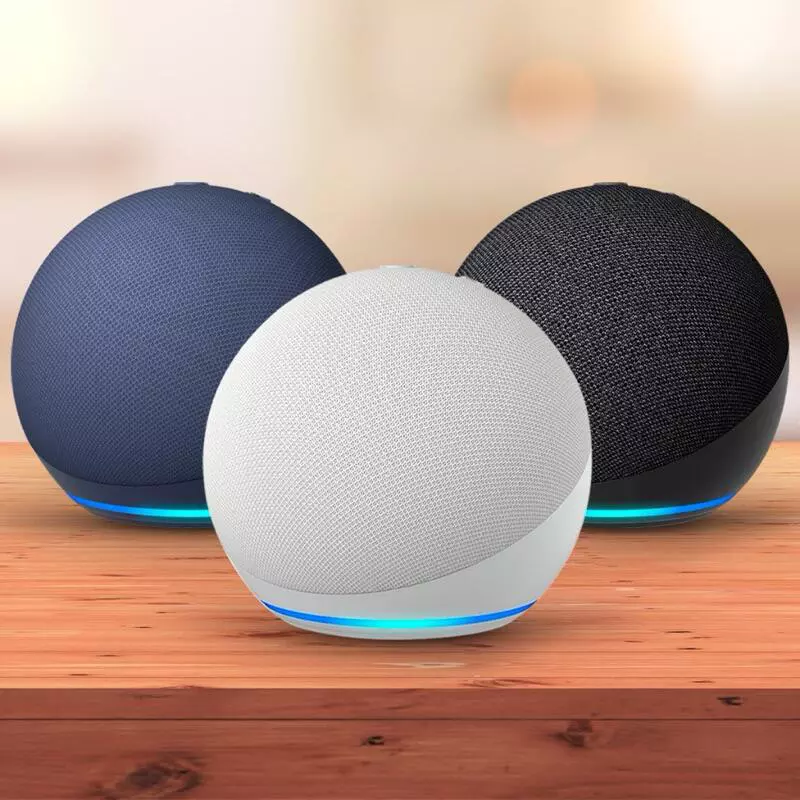
After signing in, you’ll immediately notice how the app mirrors many features found in Echo devices. The blue ring animation appears when Alexa is listening, creating a familiar visual cue that desktop users already know and love.
📱 Core Features That Make the App Indispensable
The Alexa mobile app isn’t just a remote control for your Echo devices—it’s a comprehensive virtual assistant platform with capabilities that extend far beyond basic commands. Understanding these features helps you unlock the app’s full potential.
Voice Commands Anywhere
Simply tap the blue microphone button and speak naturally. Ask Alexa to check the weather, add items to your shopping list, or control compatible smart home devices. The hands-free mode on Android devices even lets you activate Alexa without opening the app by saying the wake word.
Voice recognition has improved significantly with recent updates, understanding various accents and speech patterns more accurately than ever. Background noise filtering ensures Alexa hears you clearly even in crowded environments.
Smart Home Control Hub
Managing your connected devices becomes seamless through the app’s Devices tab. You can create groups to control multiple lights simultaneously, set schedules for thermostats, and monitor security cameras—all from a single interface.
The visual dashboard shows device status at a glance, with color-coded indicators revealing which devices are online, offline, or experiencing issues. Troubleshooting connectivity problems is simplified through built-in diagnostic tools.
Routines for Automated Living
Routines represent one of Alexa’s most powerful features. These automated sequences trigger multiple actions with a single command or scheduled time. For example, a “Good Morning” routine might gradually brighten your bedroom lights, start your coffee maker, and deliver your daily news briefing.
Creating custom routines through the mobile app is surprisingly intuitive. The drag-and-drop interface lets you arrange actions in your preferred order, with conditional triggers based on time, location, or device status.
🎵 Entertainment and Media Management
Alexa transforms your smartphone into a powerful entertainment hub. Connect your favorite streaming services including Spotify, Apple Music, Amazon Music, Pandora, and TuneIn to access millions of songs, podcasts, and radio stations.
The app’s media controls appear as persistent notifications on your lock screen, making it easy to skip tracks or adjust volume without unlocking your phone. Playlist creation and management happen seamlessly within the app, syncing across all your Alexa-enabled devices.
Audiobook lovers appreciate the tight integration with Audible. Simply ask Alexa to resume your current book, and it picks up exactly where you left off, whether you were listening on your Echo at home or through headphones on your commute.
Multi-Room Audio Experience
If you own multiple Echo devices, the app lets you create speaker groups for synchronized music throughout your home. Start a party playlist in the living room and extend it to the kitchen and patio with a few taps.
The audio streaming quality adapts intelligently to your network conditions, prioritizing smooth playback over maximum bitrate when bandwidth is limited. You’ll rarely experience buffering interruptions even on moderate connections.
🛒 Shopping and List Management Made Simple
Voice shopping reaches new convenience levels through the mobile app. Add items to your Amazon cart by simply speaking their names, then review and complete purchases through the app’s secure checkout process.
Shopping lists sync automatically across all devices, meaning items you add verbally at home appear instantly on your phone at the grocery store. You can create multiple lists—groceries, home improvement projects, gift ideas—and share them with family members.
Price tracking features alert you when items on your wish list go on sale. Alexa can even suggest products based on your previous purchases and browsing history, though these recommendations can be disabled in privacy settings.
🔔 Communication Features That Keep You Connected
The Alexa app includes robust communication tools that turn your device into a sophisticated intercom system. Make voice and video calls to other Alexa users completely free, with crystal-clear audio quality that rivals dedicated calling apps.
Drop In functionality allows instant connections to specific Echo devices in your home. Check on elderly parents, see who’s at the front door through your smart doorbell, or simply announce that dinner is ready without shouting through the house.
Announcements broadcast your voice to all Echo devices simultaneously. Record a message through your phone, and it plays on every speaker, perfect for coordinating family activities or reminding kids about bedtime.
Privacy Controls for Peace of Mind
Amazon has implemented comprehensive privacy features addressing concerns about always-listening devices. The app provides easy access to your voice history, allowing you to review and delete recordings individually or in bulk.
Mute specific devices remotely, disable camera functions on Echo Show devices, and manage which skills have access to personal information—all through clearly labeled privacy menus. Transparency reports show exactly what data Alexa collects and how it’s used.
⚡ Skills and Third-Party Integrations
The Skills marketplace contains over 100,000 voice-activated applications extending Alexa’s capabilities dramatically. Browse categories including productivity, games, education, health, and smart home to discover new functionalities.
Popular skills include meditation guides, recipe assistants, language learning tools, and fitness trackers. Installation takes seconds—just tap “Enable” and follow any account linking instructions if required.
Many skills work better through the mobile app than through Echo speakers alone, providing visual interfaces that complement voice interactions. Recipe skills display ingredient lists and step-by-step instructions on your phone screen while you cook.
Creating Custom Skills
Developers can build personalized skills using Amazon’s Blueprints templates. Create custom trivia games about your family, personalized bedtime stories for children, or specialized flash cards for studying—no coding experience required.
These custom skills remain private by default but can be shared with friends and family. The mobile app makes testing and refining your creations simple before publishing them to your household devices.
🌍 Location-Based Features and Mobility
Alexa leverages your smartphone’s GPS to provide location-aware services. Set reminders that trigger when you arrive at specific places—”Remind me to buy milk when I’m near the grocery store” becomes genuinely useful when your phone alerts you in the parking lot.
Traffic updates for your daily commute appear automatically based on saved home and work addresses. Alexa learns your typical departure times and proactively notifies you about delays or suggests alternate routes.
Location sharing with trusted contacts enables find-my-friends functionality through the Alexa ecosystem. Parents appreciate being able to check when teenagers arrive safely at destinations without intrusive constant tracking.
🔋 Battery and Performance Optimization
Concerns about battery drain are valid with any app utilizing voice recognition and background services. Amazon has optimized the Alexa app significantly, with recent versions consuming minimal power during standby periods.
Hands-free mode does impact battery life more noticeably since the app continuously listens for the wake word. Most users find the trade-off worthwhile, but you can disable this feature and use the manual button activation to extend battery life.
The app includes intelligent power management that reduces background activity when your battery drops below certain thresholds. These adjustments happen automatically without requiring manual intervention or configuration.
📊 Tips for Maximizing Your Alexa App Experience
Getting the most from your virtual assistant requires understanding some lesser-known features and optimization strategies. These tips elevate your experience from casual user to power user status.
- Enable Brief Mode: Reduces verbose responses, replacing confirmations with simple beep tones for faster interactions
- Customize Your Flash Briefing: Curate news sources that match your interests rather than accepting default options
- Use Follow-Up Mode: Ask multiple questions in succession without repeating the wake word each time
- Set Up Voice Profiles: Train Alexa to recognize different household members for personalized responses
- Explore Whisper Mode: Speak softly and Alexa whispers back—perfect for late-night commands without disturbing others
- Link Your Calendar: Sync Google or Outlook calendars for voice-activated schedule management
- Configure Notifications: Fine-tune which alerts appear on your lock screen to avoid overwhelming clutter
🔒 Security Considerations and Best Practices
Protecting your privacy while using voice assistants requires awareness and proactive security measures. The Alexa app includes several safeguards, but users should implement additional precautions for maximum protection.
Enable two-factor authentication on your Amazon account immediately. This prevents unauthorized access even if someone obtains your password. The extra login step adds minimal inconvenience while dramatically improving security.
Review connected skills periodically and remove those you no longer use. Each skill represents a potential access point to your data, so maintaining a lean skills roster reduces vulnerability surface area.
Voice purchasing can be protected with a confirmation code requirement. This prevents accidental or unauthorized purchases, especially important in households with children who might order items unintentionally.
🆚 Comparing Alexa to Other Mobile Assistants
Understanding how Alexa stacks up against Google Assistant and Siri helps you make informed decisions about which ecosystem best suits your needs. Each platform offers distinct advantages depending on your priorities.
Alexa excels in smart home integration and third-party skills, with broader device compatibility than competitors. If you’re building a comprehensive connected home, Amazon’s ecosystem provides the most flexibility and options.
Google Assistant generally provides more accurate web search results and contextual understanding for general knowledge queries. Its integration with Google services like Maps and Photos offers advantages for users heavily invested in that ecosystem.
Siri’s tight integration with Apple devices creates a seamless experience for iPhone users, with excellent privacy protections and on-device processing. However, smart home support and third-party integrations lag behind both Alexa and Google.
🎯 Troubleshooting Common Issues
Even well-designed apps occasionally encounter problems. Knowing how to resolve common issues saves frustration and support calls. Most problems have simple solutions that take just minutes to implement.
If Alexa stops responding to voice commands, first check your internet connection—the app requires active data to process requests. Restarting both the app and your phone resolves temporary glitches in most cases.
Device discovery problems often stem from network configurations. Ensure your smartphone and smart home devices connect to the same WiFi network, as most routers isolate guest networks preventing device communication.
Skill functionality issues usually clear up by disabling and re-enabling the problematic skill. This refreshes the connection and often resolves authentication errors without requiring complete account relinking.
🔮 Future Developments and Upcoming Features
Amazon continuously enhances Alexa’s capabilities through regular updates. Recent announcements preview exciting developments coming to the mobile app in upcoming releases.
Advanced natural language processing improvements will enable more conversational interactions without rigid command structures. You’ll be able to speak naturally as if chatting with a friend rather than memorizing specific phrases.
Expanded multi-modal experiences will better integrate visual and voice interfaces. The app will proactively suggest screen-based information when it enhances understanding, creating richer interaction patterns.
Enhanced personalization through machine learning will help Alexa anticipate your needs more accurately. The assistant will learn your preferences and routines, offering relevant suggestions before you even ask.
💡 Real-World Scenarios Where the App Shines
Understanding practical applications helps illustrate the app’s value beyond theoretical capabilities. These everyday scenarios demonstrate how Alexa mobile integration solves real problems and enhances daily life.
Imagine arriving home with arms full of groceries. Rather than fumbling for keys and light switches, simply ask Alexa to unlock your smart lock and turn on the lights. Your phone’s proximity sensors can trigger these actions automatically through location-based routines.
During workout sessions, control your music, set interval timers, and log exercises without touching your sweat-covered phone. Voice commands keep you focused on form and intensity rather than fiddling with screens between sets.
Parents appreciate using the app to check on sleeping children through connected baby monitors or adjust nursery temperature from anywhere in the house. Peace of mind comes from knowing you can verify everything’s okay without potentially waking the baby by entering the room.
✨ Making Alexa Your True Personal Assistant
The Alexa mobile app represents far more than a convenient remote control for Echo devices. It’s a comprehensive platform that adapts to your lifestyle, learning your preferences and anticipating your needs with increasing accuracy.
Success with any virtual assistant requires investment—not financially, but in time spent customizing settings, training voice recognition, and exploring capabilities. The rewards manifest in countless small conveniences that accumulate into significant time savings and reduced stress.
Whether you’re a smart home enthusiast, productivity optimizer, or simply someone seeking easier ways to manage daily tasks, the Alexa app delivers powerful functionality in an accessible package. Download it today and discover how voice-powered assistance can transform your mobile experience into something truly intelligent and helpful.
