
Anúncios
Your phone’s built-in speakers can deliver more punch than you think—unlocking hidden audio potential transforms how you experience every beat, explosion, and dialogue.


We’ve all been there: watching a thrilling video only to strain our ears because the volume just won’t go loud enough. Whether you’re streaming your favorite series, jamming to music during a workout, or immersed in intense mobile gaming, sound quality makes all the difference.
Anúncios
The good news? Your smartphone holds untapped audio capabilities waiting to be unleashed through smart tweaks and specialized tools.

Modern devices pack impressive hardware, yet manufacturers often limit output levels for safety and battery reasons. By understanding how to navigate system settings, leverage professional apps, and apply strategic enhancements, you can dramatically boost audio clarity and volume without investing in expensive external speakers. Let’s explore how to maximize every decibel your phone can deliver. 🎵
Anúncios
Understanding Your Phone’s Audio Limitations and Possibilities
Smartphone manufacturers deliberately cap volume levels to protect users from potential hearing damage and extend battery life. These restrictions vary by region—European models typically have stricter limits than their American or Asian counterparts. Your device’s digital-to-analog converter (DAC) and amplifier chip determine baseline audio quality, but software layers add additional constraints that can be adjusted.
The good news is that both Android and iOS systems include hidden settings that allow you to push beyond default limits. Android offers developer options and accessibility features that control audio routing, while iOS provides sound customization through its Accessibility menu. Understanding these native capabilities forms the foundation before exploring third-party solutions.
Most users never venture beyond the basic volume rocker, missing equalizer settings, audio effects, and mono/stereo configurations. These built-in tools don’t just increase loudness—they enhance clarity, balance frequencies, and reduce distortion at higher volumes. Before downloading any app, exhaust your phone’s native potential first.
Mastering Built-In System Settings for Maximum Output 🔧
Start by diving into your phone’s sound settings menu. On Android devices, navigate to Settings > Sound > Sound Quality and Effects. Here you’ll find equalizer presets designed for different content types—music, movies, and voice each benefit from distinct frequency profiles. Experiment with custom EQ settings, boosting mid-range frequencies for clearer dialogue or enhancing bass for gaming immersion.
Enable features like Dolby Atmos or similar spatial audio enhancements if your device supports them. These technologies create virtual surround sound that makes content feel more dynamic and powerful, especially when wearing headphones or using external speakers. The perceived volume increase comes from better frequency distribution rather than raw decibel output.
For Android users comfortable with technical tweaks, enabling Developer Options unlocks additional audio controls. Tap your Build Number seven times in About Phone to activate this menu, then explore options like “Disable Absolute Volume” which separates phone and Bluetooth device volume controls for finer adjustments. Be cautious with these settings—improper configurations can cause audio glitches.
Leveraging Volume Booster Applications Safely
Specialized volume booster apps work by bypassing system limitations and amplifying audio signals beyond factory settings. These tools apply software-based gain to your audio stream, pushing speakers to their maximum physical capacity. Quality apps include safeguards against distortion and speaker damage, while inferior ones may produce crackling or reduce audio lifespan.
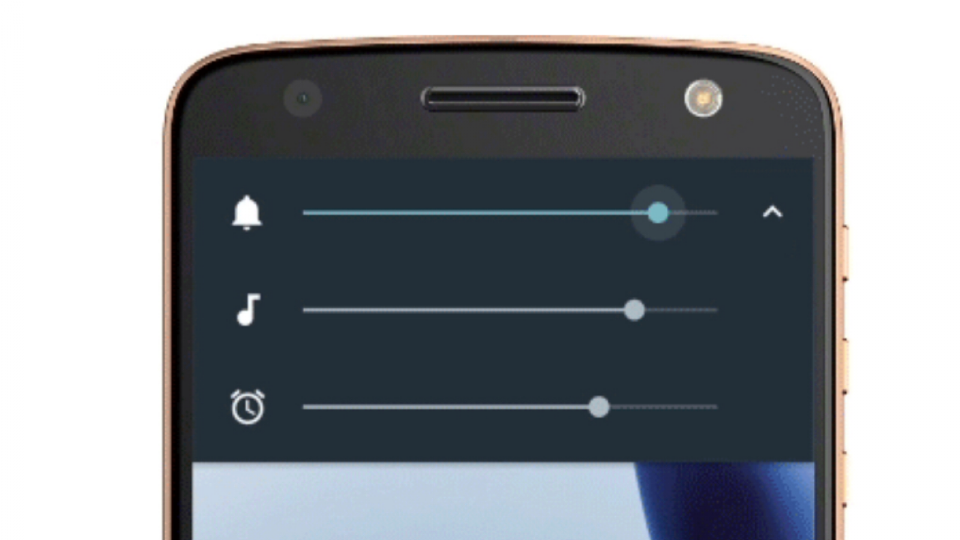
When selecting a booster app, prioritize those with positive reviews, regular updates, and transparent permission requests. The best applications offer granular control over different audio streams—media, notifications, alarms, and calls—allowing you to boost only what matters. Look for features like one-touch boost profiles, scheduled volume changes, and frequency-specific amplification.
Installation is straightforward: download from official stores, grant necessary audio permissions, and configure your preferred boost level. Start conservatively with 10-15% increases and gradually adjust upward. Most apps display real-time visualizations showing how amplification affects different frequency ranges, helping you avoid over-boosting which causes muddiness.
Optimizing Audio for Different Content Types 🎮🎬🎶
Videos demand balanced audio where dialogue remains clear while background music and effects create atmosphere. Boost mid-range frequencies (500Hz-2kHz) to enhance vocal clarity, and apply moderate compression to even out volume spikes during action scenes. Many video players include built-in equalizers—YouTube, VLC, and MX Player all offer customization before you even need external apps.
Music streaming requires different treatment depending on genre. Electronic and hip-hop benefit from bass emphasis (60Hz-250Hz), while classical and acoustic tracks need faithful reproduction across all frequencies. Use equalizer presets as starting points, then fine-tune based on your speaker’s characteristics. Phone speakers typically struggle with deep bass, so boosting too much low-end creates distortion rather than richness.
Gaming audio presents unique challenges since you need to hear subtle environmental cues like footsteps while explosions remain impactful. Create a custom profile that slightly emphasizes high frequencies (4kHz-8kHz) for detail clarity, maintains strong mid-range for action, and controls bass to prevent muddiness. Many competitive gamers prefer slight treble boosts that make directional sounds more distinct.
Physical Tricks That Amplify Perceived Volume
Your phone’s speaker placement significantly affects sound projection. Most devices place speakers on the bottom edge, firing sound away from your ears. Simple physics can redirect this audio—placing your phone in an empty bowl or cup creates a natural amplifier as sound waves reflect upward. Glass or ceramic containers work better than plastic due to material density.
Cupping your hand behind the phone creates a makeshift sound reflector, similar to how animals cup their ears to hear better. This costs nothing and works surprisingly well in quiet environments. For desk use, lean your phone against a hard surface at a 45-degree angle so the speaker fires toward you rather than into the table.
Remove any case or screen protector covering speaker grills. Even thin materials dampen output by 10-20%. If you need protection, choose cases with precise cutouts and acoustic channels designed to redirect rather than block sound waves. Some premium cases actually enhance audio through resonance chambers built into the design.
Advanced Techniques for Audiophiles and Power Users 🎧
Rooted Android devices unlock professional-grade audio modification through apps like Viper4Android. This powerful tool offers convolution-based processing, impulse response loading, and surgical equalizer control beyond consumer apps. Installation requires custom recovery and system partition access, so it’s exclusively for technically confident users willing to void warranties.
For non-rooted devices, apps supporting high-resolution audio codecs make substantial quality improvements even without volume increases. LDAC, aptX HD, and LHDC codecs transmit more audio information to Bluetooth devices, resulting in clearer sound at equivalent volume levels. Enable these in Developer Options if your headphones or speakers support them.
Consider investing in a portable DAC/amplifier dongle if you frequently use wired headphones. These USB-C or Lightning accessories bypass your phone’s internal audio hardware, providing cleaner amplification and higher output power. Models like the AudioQuest DragonFly or iFi hip-dac transform audio quality for under $100, making quiet recordings listenable without distortion.
Protecting Your Hearing While Maximizing Enjoyment
Amplifying audio beyond safe levels causes permanent hearing damage that accumulates over time. The World Health Organization recommends keeping volume below 85 decibels for extended listening, which equates to roughly 60% max volume on most smartphones. If people nearby can clearly hear your audio, you’re in the danger zone.
Use your phone’s built-in hearing protection features. Both iOS (Settings > Sounds & Haptics > Headphone Safety) and Android (Settings > Sound > Volume) offer monitoring tools that track listening levels and warn when you exceed safe thresholds. These features analyze both duration and intensity, providing weekly reports on your audio exposure.
Take regular listening breaks during long sessions—the 60/60 rule recommends listening at 60% volume for no more than 60 minutes before taking a 10-minute break. This allows your ears to recover from sustained sound pressure, reducing fatigue and preventing long-term damage. Your future self will thank you for these precautions.
Troubleshooting Common Audio Enhancement Issues 🔍
Distortion at high volumes indicates you’ve exceeded your speaker’s physical limitations. Reduce boost levels by 5-10% increments until clarity returns. If distortion persists at moderate volumes, clean your speaker grills—pocket lint and dust accumulation significantly degrade output quality. Use a soft brush or compressed air to gently clear debris.
Audio delay or lag when using booster apps stems from processing overhead. This affects gaming and video synchronization, creating frustrating mismatches between visuals and sound. Switch to apps with low-latency modes or reduce the number of audio effects applied simultaneously. Closing background apps frees processing power for real-time audio enhancement.
Battery drain increases when running constant audio amplification. Combat this by creating profiles that activate boosting only when needed—full power for media playback, standard levels for navigation and calls. Schedule automatic profile switching based on time or activity to balance performance with battery conservation.
Combining Software and Hardware for Ultimate Results
Pairing your optimized phone with quality external speakers multiplies your enhancements. Portable Bluetooth speakers with their own amplification benefit from your phone’s equalization and processing while adding superior drivers and power. Look for speakers with aptX or AAC codec support to maintain audio quality during wireless transmission.
Wireless earbuds with active noise cancellation create optimal listening conditions at lower volumes. By eliminating ambient noise, you don’t need extreme loudness to hear details. This approach protects hearing while delivering superior clarity compared to blasting phone speakers in noisy environments.
For home entertainment, connect your phone to soundbars or stereo systems via Bluetooth, USB-C, or auxiliary cables. Your phone becomes a powerful media source when paired with quality amplification. Apply boosting and equalization on the phone side, then fine-tune with the external system’s controls for professional-grade audio tailoring.
Maintaining Long-Term Speaker Health
Phone speakers are delicate components not designed for continuous maximum output. Prolonged use at extreme volumes degrades magnets, loosens adhesive, and can even tear speaker cones. Limit full-volume sessions to short bursts, and give speakers cooldown periods during extended use.
Water damage remains the primary killer of smartphone speakers. Even water-resistant phones accumulate moisture in speaker cavities over time. If your phone gets wet, immediately play audio at medium-high volume to vibrate water out of grills. Don’t use maximum volume as rapid oscillation can damage wet components.
Monitor audio quality over time—gradual decreases in volume or clarity signal speaker degradation. Many repair shops can replace individual speakers for reasonable costs, restoring your device to factory performance. Catching issues early prevents further damage to surrounding components.
Creating Custom Audio Profiles for Every Situation 📱
The most sophisticated audio setups use automation tools like Tasker (Android) or Shortcuts (iOS) to switch profiles contextually. Create a “Commute” profile with voice-focused EQ and noise reduction, a “Workout” profile emphasizing bass and maximum volume, and a “Night” profile with compression and reduced dynamics for quiet listening.
Location-based triggering automatically adjusts settings when you arrive somewhere. Entering the gym activates your high-energy profile; arriving home switches to balanced settings optimized for your living room acoustics. This level of customization requires initial setup time but delivers seamless audio experiences without manual adjustment.
Time-based profiles prevent accidentally blasting audio during inappropriate moments. Schedule automatic volume limits during work hours, bedtime restrictions to protect sleep, and weekend boosts when you’re free to enjoy content fully. Smart automation transforms your phone into an adaptive audio system that anticipates your needs.
The Future of Mobile Audio Enhancement 🚀
Emerging technologies promise even greater control over smartphone audio. Computational audio processing uses AI to analyze content in real-time, automatically optimizing EQ, compression, and volume for each scene or song. Companies like Apple and Samsung are investing heavily in machine learning models that adapt audio to your specific hearing profile and preferences.
Spatial audio with head tracking creates immersive experiences previously requiring dedicated equipment. As more content gets mixed for three-dimensional sound, phones will leverage accelerometers and gyroscopes to maintain convincing soundscapes as you move. This technology makes quiet whispers and thunderous explosions equally impactful without constant volume adjustments.
Improved speaker hardware continues closing the gap between phones and dedicated audio devices. Multi-driver arrays, larger resonance chambers, and advanced materials allow manufacturers to extract more volume and quality from compact form factors. The next generation of flagship phones will deliver audio experiences that make current models seem primitive.
Practical Recommendations for Immediate Improvement
Start your enhancement journey today by exploring native settings. Spend fifteen minutes in your sound menu discovering built-in equalizers, effects, and accessibility features. This costs nothing and often delivers 30-40% perceived improvement through proper configuration alone.
Download a reputable volume booster app and experiment conservatively. Begin with small increases, test across different content types, and note which settings provide clarity versus those that cause distortion. Keep multiple profiles for various activities rather than seeking one-size-fits-all solutions.
Invest in one quality accessory—whether a portable speaker, DAC dongle, or premium earbuds—that complements your enhanced phone audio. This single purchase multiplies the effectiveness of all software optimizations, creating a synergistic system greater than its individual parts.
Embracing Your Phone’s Full Audio Potential
Your smartphone represents a sophisticated audio system capable of delivering experiences far beyond its default configuration. By combining intelligent software adjustments, specialized applications, physical positioning tricks, and selective hardware additions, you transform everyday media consumption into something genuinely engaging and powerful.
The techniques outlined here require no special expertise—just willingness to explore settings and experiment with different approaches. Whether you’re enhancing dramatic movie moments, feeling every bass drop in your favorite tracks, or gaining competitive advantages through clearer game audio, these methods unlock capabilities manufacturers built into your device but left for you to discover.
Audio quality profoundly impacts how we experience digital content. Poor sound diminishes even the most stunning visuals, while exceptional audio elevates everything it accompanies. Take control of your smartphone’s sonic output today, and rediscover your media library through speakers finally performing at their true potential. The difference isn’t subtle—it’s transformative. 🎶
